How It Works
_______________________________________________________________________________________________
NOTE: SafetyPosterShop.com sells only the digital file, NOT the printed poster. You can download the poster files from this site and print them at your local print shop (or on your own printer) , as many as you need, at any size you want.
_______________________________________________________________________________________________
There are 2 options to obtain the safety posters here.
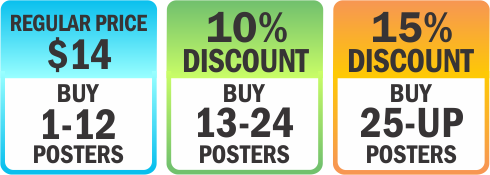
The first one is direct purchase, you simply pay for the poster you have selected (Read “HOW TO BUY” below).
The second option gives you unlimited access by joining membership. Pay one time annual membership fee , and you get unlimited free access to all the posters in one whole year. >> Click here for more details on Membership <<
How To Buy
1. Select your poster category at CATEGORIES column on the right sidebar.
2. Select the items that suit your need on the left section.
3. To buy, click ADD TO CART button below the poster description.
4. Your selected item will be displayed in your SHOPPING CART at the top right sidebar. To buy more items just repeat the above steps. If you have finished then click the CHECK OUT button.
5. You will be taken to Paypal billing page to do your payment.
6. After finishing the payment process, you will be taken eventually to the download page, where you will get your download links for the purchased items.
7. Check your inbox. You will get 2 notification emails. One is from Safety Poster Shop, and another is from Paypal.
8. From Safety Poster Shop you will get the similar content as your Download Page (fig.6), showing your purchased item and its download link. So you get 2 options to start downloading your poster : from the download page or from the notification email.
9. From Paypal you will get a payment receipt.
10. If a PDF Reader has been installed in your computer, clicking the download link might directly open the purchased poster file. You can just continue with clicking SAVE A COPY button on your PDF Reader toolbar. And…done! You have received your poster.
How To Order Custom Design
1. From the top menu bar, select your preference : ADD YOUR LOGO+NAME or CUSTOM DESIGN .You will be taken to referring page.
2. Or you can select it from the text-links at the bottom of poster description.